 by
by In the previous tutorial, we learn how to submit a form as well are read the form inputs. In this tutorial, we would see exactly how the browser client exchanges information with the web server.
There are two methods used:
First note that information being sent from the browser has to be encoded by a scheme known as URL encoding. This encoding means that the name-value pairs are joined together with an ampersand(&). Then name and values are joined with equal(=) sign. For for example:
name1=value1&name2=value2
Also note that spaces are removed and replaced with plus(+). Non-alphanumeric are also replaced with equivalent hexadecimal values.
1. Using the GET Method
The URL encoded information is appended and sent. The actual page url (for example https://www.kindsonthegenius.com) and the encoded data are separated by a question mark(?). So we have something like:
https://www.kindsonthegenius.com?id=1&name=kindson
Some of the characteristics of the GET method is given below:
- the GET method can only send a string of 1024 characters maximum
- the GET method produces the strings normally seen on the browser’s address box
- the GET method should not be used to send passwords or any other sensitive data
- information sent by the GET method can be accessed using the QUERY_STRING environment variable
- you cannot used the GET method to send binary data such as word documents or images
- to access all the information from the GET method, you need to use the $_GET associative array
Let’s give a demo on how the get method works:
<?php
    if($_GET["name"] || $_GET["subject"] || $_GET["score"]){
        echo "Hi ".$_GET["name"] . "<br>";
        echo "You scored ".$_GET["score"]. " in ".$_GET["subject"];
        exit();
    }
?>
<html>
    <body>
        <form action="<?php $_PHP_SELF ?>" method="GET" >
            Name: <input name="name" type="text" />
            Subject: <input name="subject" type="text" />
            Score: <input name="score" type="text" />
            <input type="submit" />
        </form>
    </body>
</html>
The output of the code would be:

And once you enter the data and submit, you will see the output as shown below. Also note the encoding in the address bar
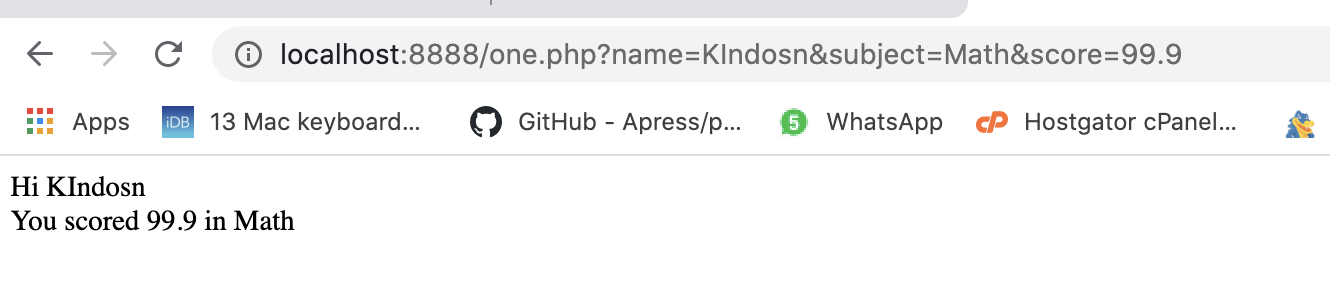
2. The POST Method
Similar to the GET method, the POST method is use to transfer information to the server. However, unlike the GET method, the POST method, puts date into the header as QUERY_STRING.
Here are some characteristics of the POST method:
- data sent using the POST method goes through HTTP header
- the post method does not place any restriction on the length of the data
- the POST method can be used to sent both text(ASCII) as well as binary data
- the $_POST associative array is used to retrieve data sent by the POST method
The example is similar to that for the GET method but with all the GETs replace by POST. I recommend you try it yourself and also take a look at the address bar and see that the values are not shown there.
As side note, if you want to validate the text entered in the name box, you can use the piece of code below:
if(preg_match("/[^A-Za-z'-]/", $_POST["name"])){
    die("name is invalid");
}
3. The $_REQUEST Variable
Another special variable provided by PHP is the $_REQUEST variable. This variable contains both $_GET, $_POST and $_COOKIE variables. The $_REQUEST variable can be used to get the result in place of using the $_GET and $_POST.
As before, simply replace the $_GET with $_REQUEST in the previous example.
