 by
by Loops in PHP are used to execute the same block of code a give number of times. We would examine the following four types of loops supported by PHP. Then we also briefly look at two important statements used with loops: break and continue.
1. for Loop
The for loop is used when the number of times the loop is to be executed is known.

Syntax for the for loop is given below:
for (initialiser; condition; increment){
   code to be execute;
}
The initialiser is used to set the initial value of the counter. The condition is the expression to be checked after each iteration. Increment is the expression that increments the counter. Ans example of the for loop is given below. In this example, the loop executes 10 times
<?php
    //for loop example
    $x = 0;
    $y = 0;
    for($i = 1; $i < 10; $i++){
        $z = $x + $y;
        echo ("Sum of $x and $y is  $z <br>");
        $x += 1;
        $y += 1;
    }
?>
2. while Loop
The while statement will execute a block of code if a test expression is true. After the code is executed, the the test expression is checked again. If it is true then repeat. This continues until the test expression is false.
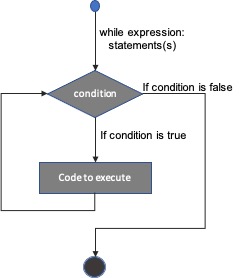
The example below is similar to that with the for loop, but this time with a while() loop.
<?php
    //for loop example
    $a = 0;
    $b = 0;
    while($c <= 20){
        $c = $a + $b;
        echo ("Sum of $a and $b is $c <br>");
        $a += 2;
        $b += 2;
    }
?>
3. do…while Loop
This is similar to the while loop but it would execute the block of code at least 1 time. This is because the conditional expression comes after the block of code
The syntax is:
do {
   code to be executed;
}
while (condition);
The following example will increment the value of the variable at least one time.
<?php
    $b = 0;
    $a = 0;
    do{
        $c = $a + $b;
        echo ("Sum of $a and $b is $c <br>");
        $a += 3;
        $b += 3;
    }
    while($c <= 20)
?>
4. foreach Loop
The foreach statement is normally used to loop through array of values. For each iteration of the loop, the array element is assigned to a variable and the pointer moves to the next element. The syntax is:
foreach (array as value) {
   code to be executed;
}
In the example below, we use a foreach loop to output all the values of an array.
<?php
    $names = array("Jadon", "Solace", "Adaoma");
    foreach($names as $name){
        echo "$name <br>";
    }
?>
5. break and continue statements
The break statement is used to exit from a a loop even if the loop has not completed its execution. An example of this is with the switch statement discussed under Conditional Statements.
The continue statement is used to skip the current iteration of a loop. For example consider the code below, we use the continue statement, with a foreach loop to skip the output for a particular name.
<?php
    $names = array("Ofure", "Solace", "Esther");
    foreach($names as $name){
        if($name == "Solace")
            continue;
        echo "$name <br>";
    }
?>
