 by
by In this tutorial, we would learn about Conditional Statements in PHP. These are statements that allow you to make decisions based on certain conditions. The figure below illustrates how conditional statements work.
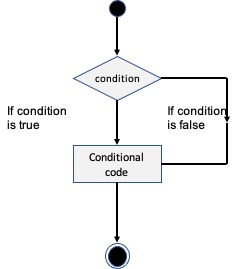
There are three types of conditional statements we would cover in this tutorial:
1. The if…else Statement
The if…else statement is used if you want to execute some piece of code based on a statement being true. So if the statement evaluates true, then execute the code, otherwise execute another code. The syntax is
if (condition)
   code to execute if condition is true;
else
   code to execute if condition is false;
Example
The example below shows how to use the if…else statement. When the code executes, it will display “Take an umbrella”if the weather is rainy. Otherwise it would display “Have a great day!”
<html>
   <body>

      <?php
         $weather = "rainy";

         if ($weather == "rainy")
            echo "Take an umbrella";

         else
            echo "Have a great day!";
      ?>

   </body>
</html>
2. The elseif statement
This is similar to the if…else statement. However, in this case, we would have could have multiple conditions. The code that corresponds to the condition that evaluates true is executed.
In the example below, the current day would be evaluated, if it is Friday, the “Have a good weekend” is displayed. If it is Sunday, it outputs “Enjoy your Sunday, dear!” else it outputs “Have a great day”
<html>
   <body>
      <?php
         $day = date("D");

         if ($day == "Fri")
            echo "Have a great weekend!";

         elseif ($day == "Sun")
            echo "Enjoy your Sunday!";

         else
            echo "Have a great day!";
      ?>
   </body>
</html>
3. The switch statement
The switch statement allows us to select one of multiple blocks of code to be executed. It is used instead of long blocks of if…else code. The code below examines
<html>
   <body>
      <?php
        $grade = "A";
        switch($grade){
            case "A":
                echo "Excellent grade";
            break;
            case "B":
                echo "Very good grade";
            break;
            case "C":
                echo "Good";
            break;
            case "D":
                echo "You Passed";
            break;
            default:
            echo "So far so good";
        }
      ?>
   </body>
</html>
