
 by
by Learn how multi-tenancy works in SaaS, compare database strategies, and see how Alkademy Press uses PostgreSQL and tenant isolation.
TL;DR
-
Multi-tenancy lets one SaaS application serve multiple organisations while keeping their data logically isolated.
-
Three common strategies are shared database with
tenantId, schema-per-tenant, and database-per-tenant. -
Shared database with
tenantIdis often the practical starting point for SaaS products with similar tenant requirements. -
Alkademy Press uses row-level multi-tenancy with a shared PostgreSQL database and
tenantIdto isolate organisations. -
Tenant isolation requires discipline across queries, authentication, caching, files, background jobs, and authorization.
Multi-tenancy is how modern SaaS products serve many customers from one application — without building a separate install for every organisation. Get it right and you ship faster, keep costs predictable, and still protect each customer’s data. Get it wrong and you risk cross-tenant leaks, painful migrations, or an ops bill that never stops growing.
This guide explains what multi-tenancy is, compares the main implementation methods, and walks through a real product: Alkademy Press — Alkademy’s journal management platform for academic publishers. You will see which method Press chose, why it fits, and how tenant context flows from browser request to database query.
Who this is for: backend and SaaS engineers choosing a tenancy model. Depth: conceptual patterns plus light code snippets (no full project walkthrough). Reading time: about 15–20 minutes.
What Is Multi-Tenancy?
Multi-tenancy means a single running product serves many independent customers (tenants). Each tenant feels like they have their own system — their users, data, branding, and often their own plan limits — while the vendor runs one codebase and shared infrastructure.
Contrast that with single-tenant (or multi-instance) deployments: one customer, one dedicated stack. Single-tenant can be simpler for extreme compliance or heavy customization, but it does not scale operationally when you have hundreds of organisations.
In B2B SaaS, a tenant is usually an organisation, not a single person. Inside that organisation you still have roles (admin, editor, author) and nested resources (projects, workspaces, journals). Multi-tenancy is the outer boundary: Organisation A must never see Organisation B’s data.
A useful mental model:
- Platform — your company, shared catalog, billing engine, platform admins
- Tenant — the paying organisation (university press, institute, consortium)
- Resources — everything that belongs to that organisation (users, journals, submissions, invoices)
Do not confuse tenants with users. A tenant is the billing and isolation boundary. A user is a person who acts inside that boundary (and sometimes inside several tenants over time). Good SaaS products model both explicitly: organisations own data; people get memberships and roles.
Alkademy Press follows exactly that shape: platform above, organisations as tenants, journals and editorial workflows underneath. We return to that case study after the pattern comparison.
Why Multi-Tenancy Is Hard
Multi-tenancy is not just a tenant_id column. It cuts across architecture, security, product, and operations:
- Data isolation — every query, file download, cache key, and background job must know which tenant it belongs to. One missing filter can leak data across customers.
- Shared vs custom — tenants want branding, domains, and plan limits; you still want one product to evolve. Too much customization recreates single-tenant complexity.
- Noisy neighbors — one heavy tenant can saturate a shared database or queue unless you meter usage and enforce limits.
- Compliance — some customers demand dedicated databases, region pinning, or exportable backups. Your tenancy model either supports that or forces a hybrid later.
- Blast radius — a bad migration or outage hits every tenant on shared infrastructure. Isolation strategy is also a risk strategy.
Isolation is a spectrum, not a boolean. The methods below trade isolation strength against cost and operational complexity.
Implementation Methods Compared
There are three classic database strategies for multi-tenancy. Most SaaS products pick one as the default and optionally offer a stronger tier for enterprise customers (hybrid).
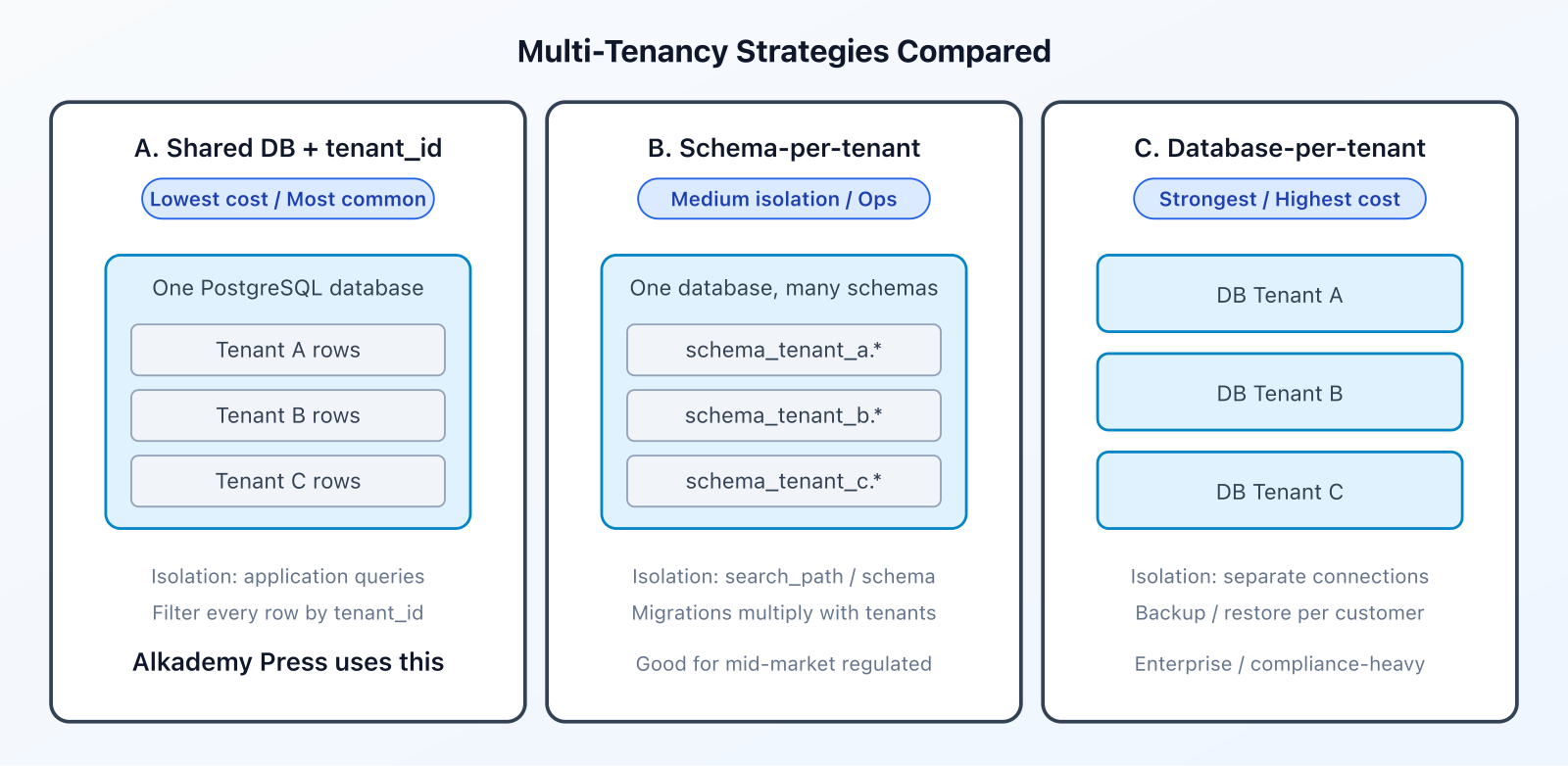
Method A — Shared database, shared schema, tenant_id (row-level)
All tenants live in the same database and same tables. Almost every business row carries a discriminator such as tenantId. Application code (or database policies) ensures queries always filter by that column.
Pros: lowest infrastructure cost, simplest migrations, easiest analytics across tenants, natural fit for identical product schemas.
Cons: isolation depends on discipline — a forgotten WHERE tenant_id = ? is a security bug; noisy neighbors share indexes and connection pools.
Best for: most B2B SaaS at early and mid scale; products where every tenant uses the same domain model.
Light shape of the data model:
model Tenant {
  id     String @id @default(uuid())
  slug   String @unique
  name   String
  plan   String @default("free")
  status String @default("active")
}

model User {
  id       String @id @default(uuid())
  tenantId String
  email    String
  name     String

  @@unique([tenantId, email])
  @@index([tenantId])
}

model Submission {
  id       String @id @default(uuid())
  tenantId String
  // ... workflow fields

  @@index([tenantId])
}
And the corresponding query pattern:
// Always scope by both resource id AND tenant
const submission = await prisma.submission.findFirst({
  where: { id: submissionId, tenantId },
});
Method B — Shared database, schema-per-tenant
Still one database server, but each tenant gets a separate schema (for example tenant_acme, tenant_northgate). Connection or session settings point queries at the correct schema.
Pros: stronger logical separation; easier to drop or export one tenant; fewer “forgot the filter” bugs inside a schema.
Cons: migrations must run across every schema; connection routing and pooling get harder; tooling is less convenient than a single schema.
Best for: mid-market products with moderate tenant counts and stronger isolation needs without full DB silos.
Method C — Database-per-tenant
Each tenant (or each enterprise customer) gets a dedicated database — sometimes even a dedicated cluster. The app selects a connection string from a tenant registry.
Pros: strongest isolation, per-tenant backup/restore, clearer compliance story, tunable performance per customer.
Cons: highest ops cost; schema migrations become a fleet problem; you need solid automation for provisioning, monitoring, and connection management.
Best for: enterprise / regulated offerings, or a premium “private instance” tier alongside a shared pool.
Method D — Hybrid and extras
Many mature platforms combine approaches:
- Shared DB for standard plans; dedicated DB for enterprise
- Row-Level Security (RLS) in PostgreSQL as defense-in-depth on top of Method A
- Cell-based architecture — groups of tenants on isolated “cells” of infra for blast-radius control
These are evolutions. You rarely need them on day one if Method A is implemented carefully.
How to Choose a Method
| Question | Lean toward |
|---|---|
| Hundreds/thousands of similar tenants? | Method A (shared DB + tenant_id) |
| Need easy per-tenant export/delete? | B or C (or A with careful tooling) |
| Contracts demand dedicated data stores? | Method C (or hybrid) |
| Small team, one product schema? | Method A |
| Heavy per-tenant customization of schema? | Revisit product design first — then B/C |
Rule of thumb: start with Method A unless compliance or enterprise sales force you higher. You can always offer a dedicated database later for a premium tier; starting on Method C for every free trial customer is how teams drown in ops work.
Also decide early what “delete tenant” means: soft-suspend, hard purge, or export-then-delete. Method A makes purge a careful multi-table cleanup. Methods B and C make drop-schema / drop-database tempting — still verify backups and legal retention first.
Alkademy Press made the Method A choice deliberately — covered next after tenant resolution.
Resolving Tenant Context on Every Request
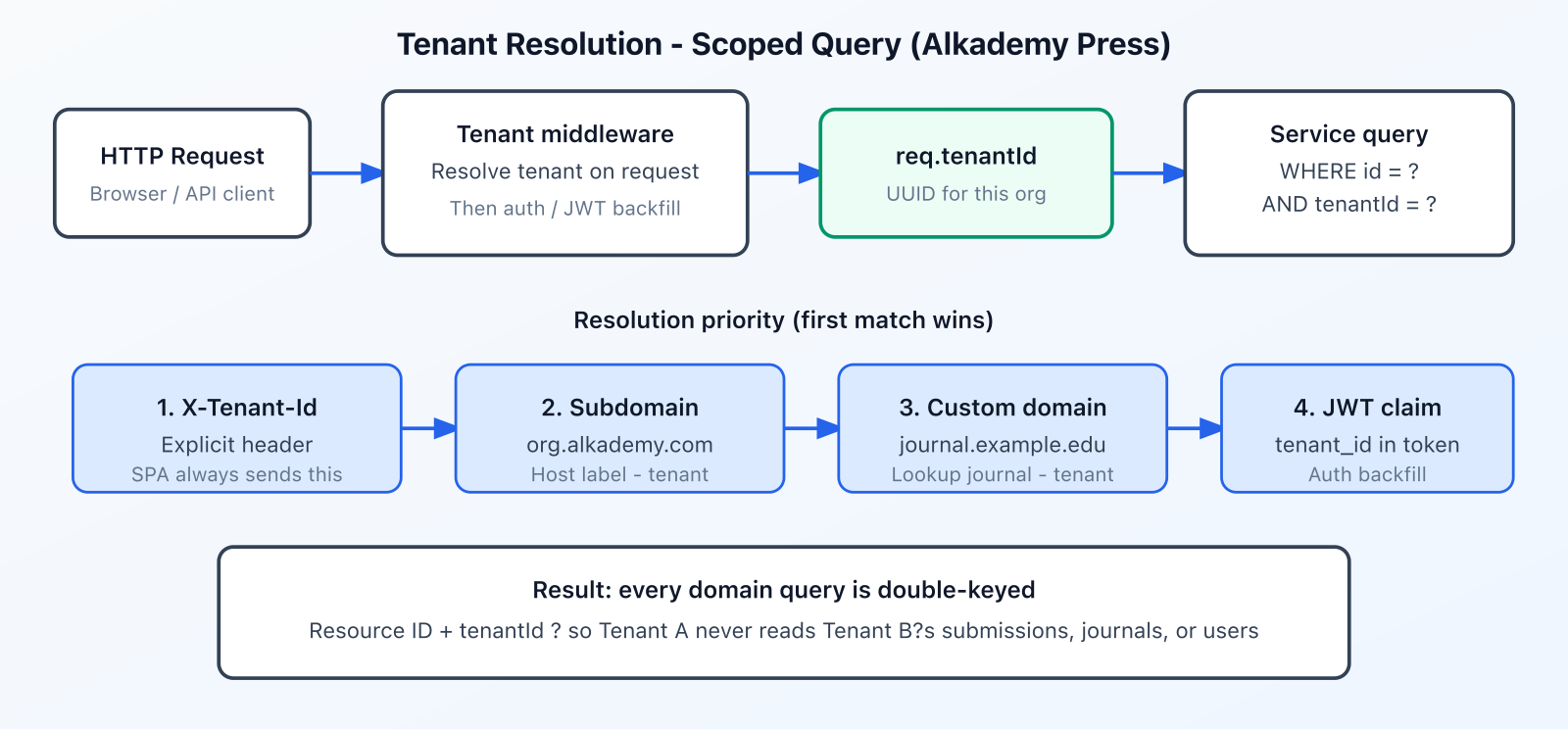
Regardless of database strategy, every request must answer: which tenant is this? Common signals:
- Explicit header — e.g.
X-Tenant-Idfrom a logged-in SPA - Subdomain —
northgate.yourproduct.com - Custom domain —
journal.university.edumapped to a tenant - JWT / session claim —
tenant_idembedded at login - Path —
/t/{slug}/...(less common for APIs)
Production systems often support several signals with a clear priority order. The browser app may always send a header, while public journal sites resolve via custom domain. Auth still carries a claim so tokens cannot wander across organisations.
Case Study: Alkademy Press
Alkademy Press is a multi-tenant Journal Management System for academic publishing. University presses, research institutes, and consortia run submissions, peer review, editorial workflows, and public journal websites from one SaaS product — instead of installing and maintaining a separate journal stack per organisation.
That product shape is a textbook multi-tenancy problem: dozens or hundreds of organisations, nearly identical workflows, strong expectations that Press A never sees Press B’s manuscripts, and a need for self-serve branding (logos, colors, custom domains) without forking the codebase.
Tenant hierarchy in Press:
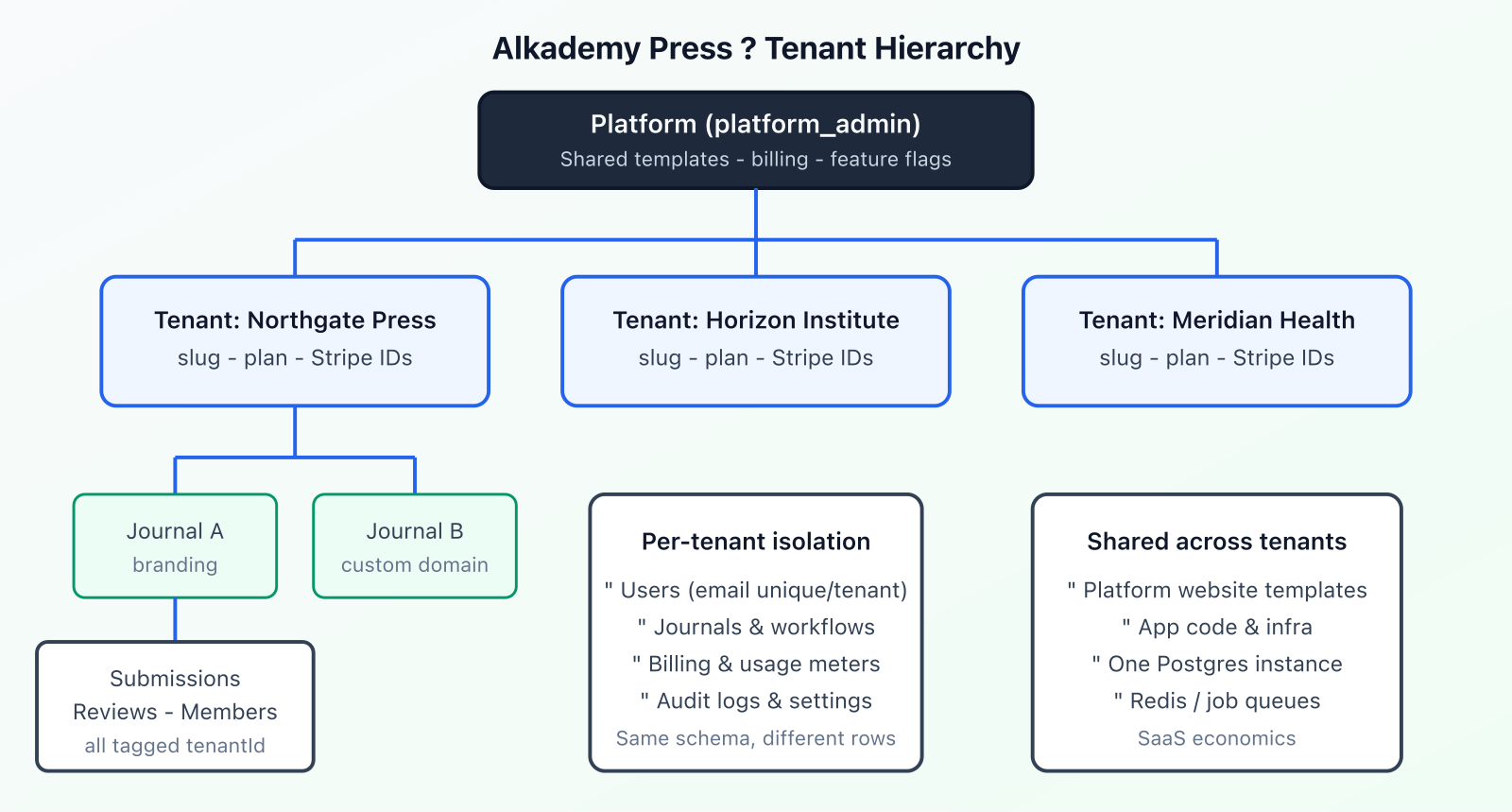
- Platform — Alkademy operators; shared website templates; feature flags; tenant provisioning
- Tenant — the publishing organisation (name, slug, plan, status, Stripe customer)
- Journal — one or more journals per tenant, with branding, APC settings, optional custom domain
- Workflow data — members, submissions, review rounds, volumes/issues, audit logs — all tenant-scoped
Users are unique per tenant (tenantId + email), so the same person can belong to different organisations with separate memberships and roles. Roles span platform admin down through tenant admin, editor, reviewer, and author.
What Method Alkademy Press Uses
Alkademy Press uses Method A: shared PostgreSQL database, shared schema, row-level multi-tenancy via a tenantId discriminator.
That was an explicit architecture decision early in the product: one database, tenant isolation enforced by tagging domain rows and filtering in application services — not schema-per-tenant, not database-per-tenant, and not Postgres Row-Level Security as the primary control.
Why that fit Press:
- Every organisation runs the same journal/editorial domain model
- SaaS economics matter — many presses on shared infra
- A NestJS + Prisma stack stays simple when there is one schema to migrate
- Plan limits, branding, and custom domains provide differentiation without siloed databases
Tenant resolution in Press
Incoming requests resolve tenant context in this priority order:
X-Tenant-Idheader (highest) — the React app sends the logged-in user’s tenant UUID on API calls- Platform subdomain — host under the product domain suffix
- Custom domain — look up the journal’s configured domain, then attach that journal’s
tenantId - JWT claim
tenant_id— backfilled during authentication if still unset
Conceptual middleware (simplified):
async use(req, _res, next) {
  const headerTenantId = req.headers['x-tenant-id'];
  if (headerTenantId) {
    req.tenantId = headerTenantId;
    return next();
  }

  const host = (req.headers.host ?? '').split(':')[0];

  if (host.endsWith(domainSuffix)) {
    const subdomain = host.slice(0, -domainSuffix.length);
    if (subdomain && !subdomain.includes('.')) {
      req.tenantId = subdomain;
      return next();
    }
  }

  const journal = await prisma.journal.findFirst({
    where: { customDomain: host },
    select: { tenantId: true },
  });
  if (journal) {
    req.tenantId = journal.tenantId;
    return next();
  }

  // JWT strategy may still attach tenant_id after auth
  next();
}
On the client, the access token and tenant id travel together:
api.interceptors.request.use((config) => {
  const token = authStore.accessToken;
  const tenantId = authStore.user?.tenantId;
  if (token) config.headers['Authorization'] = `Bearer ${token}`;
  if (tenantId) config.headers['X-Tenant-Id'] = tenantId;
  return config;
});
Isolation in practice
Controllers pass req.tenantId into services. Services do not look up a submission “by id alone” — they look it up by id and tenant. That pattern repeats across journals, members, reviews, and billing usage events.
const submission = await prisma.submission.findFirst({
  where: { id, tenantId },
});
if (!submission) throw new NotFoundException('Submission', id);
Returning “not found” (instead of “forbidden”) for cross-tenant ids avoids leaking whether a resource exists in another organisation.
What is shared vs isolated in Press
| Resource | Shared or isolated? |
|---|---|
| PostgreSQL database & schema | Shared |
| Journals, submissions, reviews, audit logs | Isolated by tenantId |
| Users & roles | Isolated per tenant |
| Stripe billing & plan meters | Per tenant |
| Website templates (catalog) | Shared platform catalog; adopted per journal |
| App servers, Redis queues, object storage stack | Shared infra; logical isolation in app |
Suspended tenants are blocked at login when status is not active — another tenancy control that sits above raw SQL filters.
Multi-Tenant Features in Alkademy Press
Row-level tenancy is the foundation. Product features built on top of it include:
- Organisation provisioning — platform admins create tenants (name, slug, plan) and optional tenant admins.
- RBAC — platform_admin, tenant admins, editors, reviewers, authors — claims stay within the active tenant.
- Per-journal branding — logos, banners, color themes, and publishable website templates.
- Routing flexibility — subdomain-style hosts, custom domains for public journal sites, and path/slug public URLs.
- Plan limits — free / starter / pro / enterprise meters (journals, submissions per month, AI screenings, storage).
- Impersonation — platform support can open a session as a user inside a target tenant when needed.
- Feature flags & announcements — global defaults with per-tenant overrides or targeting.
- Audit trail — tenant-scoped audit logs for editorial and admin actions.
That mix is typical of healthy Method A products: shared core, tenant-scoped data, tenant-visible customization at the edges.
Common Pitfalls and How to Harden
Whether you build the next Alkademy Press or a different SaaS, watch for these Method A failure modes:
- Missing tenant filter — any
findUnique({ where: { id } })on tenant data is suspect. Prefer composite checks (id + tenantId) or automated ORM scoping. - IDOR across tenants — authorization that checks “user is editor” without also checking “resource.tenantId === currentTenantId”.
- Cache and file keys — Redis keys and storage paths should include tenant (or be reachable only through tenant-checked DB rows).
- Background jobs — enqueue
tenantIdwith the job payload; never infer it from ambient global state alone. - Ambiguous host resolution — if subdomains carry slugs but foreign keys store UUIDs, map slug → id explicitly before querying.
- Analytics shortcuts — admin “all tenants” reports must be platform-only routes, never reused by tenant APIs.
Hardening path as you mature:
- Lint / code review checklists for tenant filters
- Integration tests that attempt cross-tenant reads and expect 404
- Optional Prisma (or ORM) middleware that auto-injects
tenantId - Optional PostgreSQL RLS as defense-in-depth for the same discriminator column
Alkademy Press today relies on application-level filtering — clear, explicit, and sufficient for a disciplined codebase — with room to add automated scoping later without changing the underlying Method A model.
One more practical tip: treat platform-admin “view all tenants” screens as a separate surface with separate authorization. Reusing a tenant list API without a platform role check is how internal tools accidentally become cross-tenant data dumps. In Press, platform concerns (provisioning, impersonation, global flags) sit above the tenant app, not beside it with weaker guards.
Frequently Asked Questions
What is multi-tenancy in SaaS?
Multi-tenancy is an architecture where one application instance serves many customer organisations (tenants). Each tenant’s users and data are logically isolated while infrastructure and codebase stay shared.
What are the main multi-tenancy implementation methods?
The three core methods are: (A) shared database with a tenant_id column, (B) schema-per-tenant in one database, and (C) database-per-tenant. Hybrids and Postgres RLS build on these.
Which multi-tenancy method does Alkademy Press use?
Alkademy Press uses Method A — a shared PostgreSQL database and shared schema, with row-level isolation via tenantId on domain tables. Tenant context is resolved from header, subdomain, custom domain, or JWT, and services filter every query by tenant.
Is shared-database multi-tenancy secure?
Yes, when every code path enforces tenant scope and you test for cross-tenant access. Security depends on engineering discipline (and optionally RLS). It is the industry-standard approach for most SaaS products.
When should I use database-per-tenant instead?
Choose it when contracts, compliance, or performance isolation require a dedicated store — or as an enterprise tier beside a shared pool for standard customers.
How do you resolve which tenant a request belongs to?
Common signals are X-Tenant-Id, subdomain, custom domain, and JWT tenant_id. Alkademy Press checks them in that priority order, with the SPA typically sending the header for authenticated API calls.
What is the difference between multi-tenant and multi-instance?
Multi-tenant: one deploy, many organisations. Multi-instance (single-tenant): separate deploys or stacks per customer. Multi-instance maximizes isolation and cost; multi-tenant maximizes leverage.
Next Steps
- Map your domain: what is a tenant, and what nests under it?
- Pick Method A unless compliance forces B/C — document the decision.
- Design tenant resolution (header / host / JWT) before writing feature CRUD.
- Make
tenantIdmandatory on every tenant-owned table and every query path. - Add cross-tenant access tests early — they pay for themselves.
- Explore Alkademy Press if you work in academic publishing workflows.
Building SaaS or academic publishing software? See Alkademy Press for multi-tenant journal management, or explore Alkademy courses for hands-on backend and cloud training.
