
 by
by In this lesson, I will show you how to install Python 3.6 and set up Django 2.0 in 6 easy steps using virtualenv and pip.
Step 1: Download and Install Python
Download the Python 3.6.3 from the website link below
https://www.python.org/downloads/windows/
Make sure you choose the installer that matches your operating system whether 32 or 64bit.
Create a folder in drive C or D and call it python36
Run the installation. Choose custom installation and make sure the following is selected:
- Install for all users
- Add Python the environment variables
- Create shortcuts for installed applications
- Precompiled standard library
Install python to the folder python36 that you created.
Step 2: Create a Workspace (Folder)
Just create another folder in your drive C or D and call it workspace
(you can also use another name)
Step 3: Install virtualenv
This is a tool that helps you create something similar to a web server. To install virtualenv:
Open Windows PowerShell(run as Admnistrator) and enter the command:
pip install virtualenv
Step 4: Create a Folder to Keep you Websites
To create this folder (here I call it local_sites):
Navigate to the Workspace folder you created and run the command:
virtualenv local_sites
This commands creates the folder.
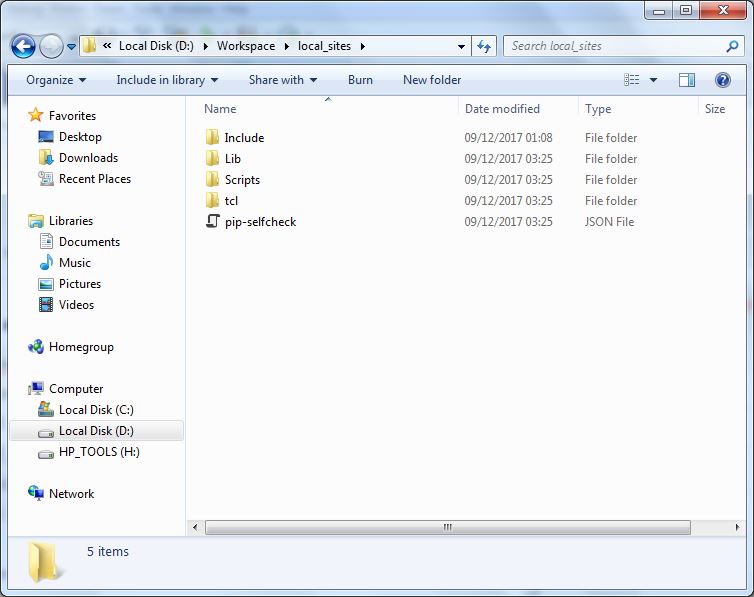
You can go the location of your workspace from ‘My Computer’ to verify that the virtual environment have been created. You can open it and verify it contains the items as shown below:
Step 5: Activate the Development Environment
This means that the folder becomes a web folder such that the web pages inside can be access from your browser over HTTP
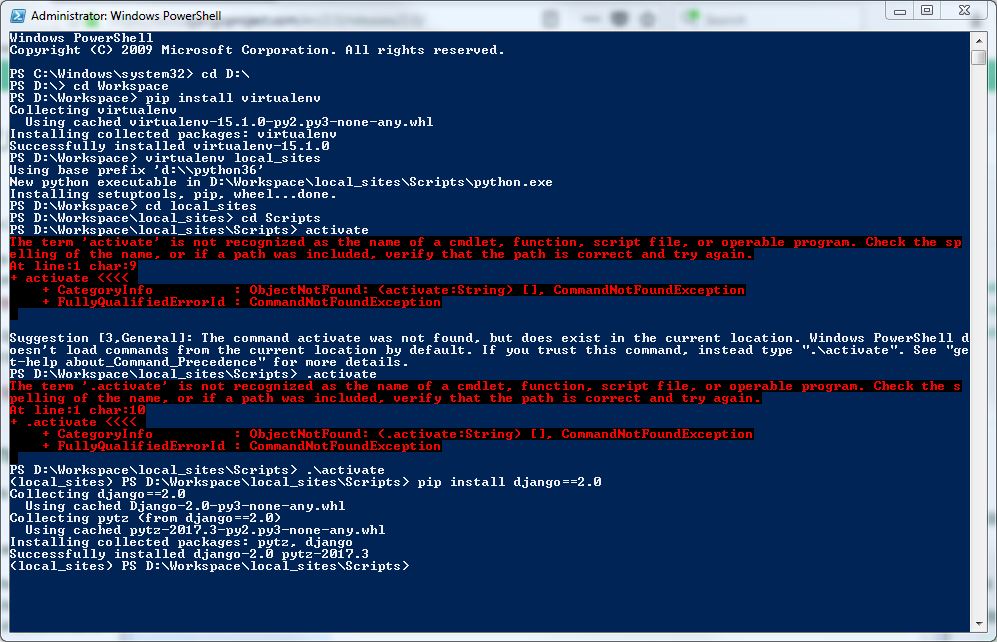
To activate the virtualenv, in the command prompt, navigate to the script directory and run the command
.activate
Vidoe Tutorial: How to Setup Python 3.6 and Django 2.0 using pip and virtualenv


This is noted. I'm working on a series of lessons on that. You can Follow and Subscribe to get notified when posted.
https://www.youtube.com/channel/UCvHgEAcw6VpcOA3864pSr5A/featured?view_as=subscriber
TY, Will you create a tutorial series on Django latest version also?
Hello. I have checked your kindsonthegenius.com and i see you’ve got some
duplicate content so probably it is the reason that you don’t rank high in google.
But you can fix this issue fast. There is a tool that generates articles like human, just search in google:
miftolo’s tools
Since the admin of this web page is working, no doubt very
soon it will be famous, due to its quality contents.