 by
by Learn how to build an MCP server in Python on your laptop and plug it into Cursor so the AI can call your tools.
This beginner mcp server python tutorial uses FastMCP, a local notes example (no API keys), and clear diagrams that show how MCP relates to a normal API.
Prerequisites: Python 3.10+, basic Python functions, and Cursor installed. Helpful background: Introduction to Machine Learning and the Python tutorials hub.
Estimated time: 30–45 minutes. Difficulty: Beginner.
TL;DR
-
MCP (Model Context Protocol) provides a standard way for AI applications like Cursor to interact with tools and data.
-
FastMCP makes it easy to turn regular Python functions into MCP tools that an AI host can call.
-
In this tutorial, you’ll build a local notes MCP server with
add_note,list_notes, andsearch_notestools. -
The server stores notes in a simple
notes.jsonfile, so you don’t need a database or API keys. -
You’ll use MCP Inspector to test the server before connecting it to Cursor.
-
You’ll configure Cursor to launch your Python server and call its tools through MCP.
-
The same approach can later be extended to APIs, databases, files, business systems, and other AI-powered workflows.
What Is MCP?
MCP stands for Model Context Protocol. In plain English: it is a standard plug so AI apps can talk to tools and data.
Think of it as USB for AI tools:
- Host — Cursor or Claude Desktop (the AI app)
- MCP — the standard protocol between host and server
- Your server — a Python process you write
- Tools — normal functions the model can call (save a note, search a file, call an API)
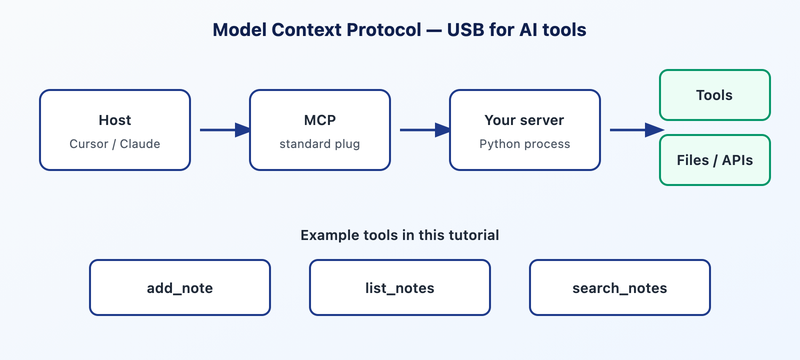
Without MCP, you copy context into a chat window and paste answers back. With MCP, the model calls your function, gets a real result, and keeps going.
MCP vs an API
Beginners often ask: isn’t MCP just an API? They are related — but the client is different.
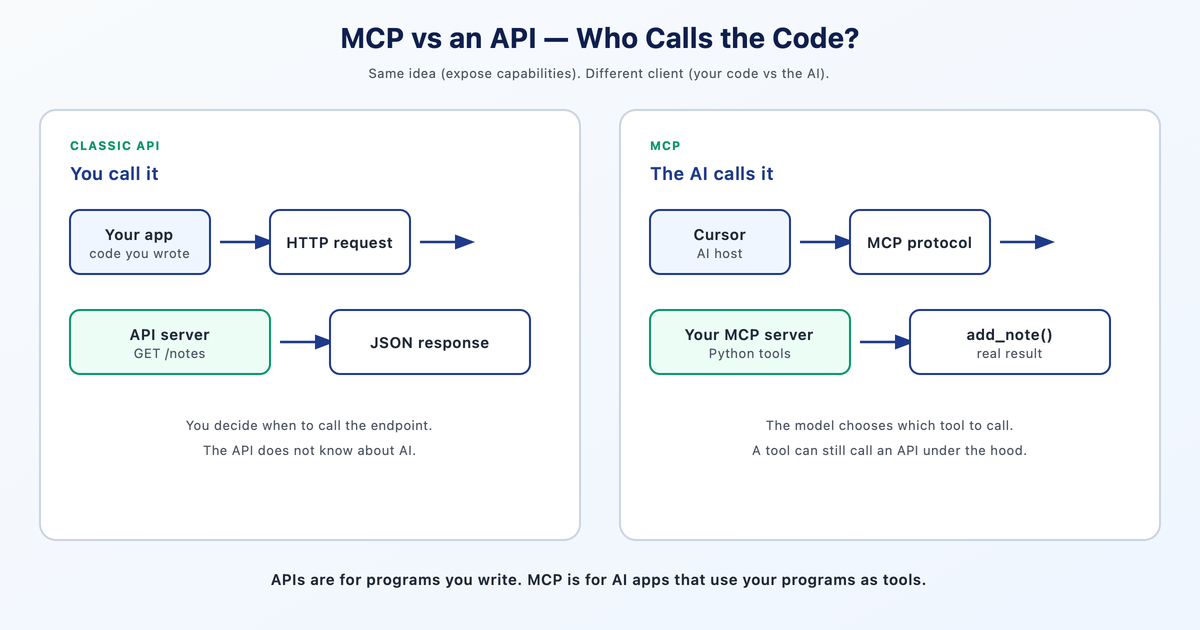
- Same idea — both expose capabilities over a standard interface.
- Different client — with an API, you (or your app) decide when to call
GET /notes. With MCP, the model choosesadd_note. - Can combine — an MCP tool can call an API under the hood. MCP does not replace APIs; it sits in front of the AI so the model can use your capabilities as tools.
One-liner: APIs are for programs you write. MCP is for AI apps that need to use your programs as tools.
What You Will Build
A personal notes MCP with three tools:
add_note— save a title and bodylist_notes— list titlessearch_notes— find notes by keyword
Data lives in a local notes.json file. No database, no cloud API keys.
Step 1: Project Setup
Confirm Python 3.10+:
python3 --versionCreate the project with uv (preferred by the official MCP docs). Pip also works.
mkdir notes-mcp && cd notes-mcp
uv init
uv add "mcp[cli]"
The [cli] extra installs the mcp command — especially mcp dev, which opens the MCP Inspector so you can test tools before wiring Cursor.
Step 2: Write the FastMCP Server
Create server.py. FastMCP (from the official mcp package) turns normal Python functions into tools. Type hints become the argument schema; the docstring becomes the description the model sees.
import json
from pathlib import Path

from mcp.server.fastmcp import FastMCP

mcp = FastMCP("notes")
NOTES_FILE = Path(__file__).with_name("notes.json")


def _load() -> list[dict]:
    if not NOTES_FILE.exists():
        return []
    return json.loads(NOTES_FILE.read_text())


def _save(notes: list[dict]) -> None:
    NOTES_FILE.write_text(json.dumps(notes, indent=2))


@mcp.tool()
def add_note(title: str, body: str) -> str:
    """Save a new note with a title and body."""
    notes = _load()
    notes.append({"title": title, "body": body})
    _save(notes)
    return f"Saved note: {title}"


@mcp.tool()
def list_notes() -> str:
    """List all saved note titles."""
    notes = _load()
    if not notes:
        return "No notes yet."
    return "\n".join(f"- {n['title']}" for n in notes)


@mcp.tool()
def search_notes(query: str) -> str:
    """Search notes by keyword in title or body."""
    q = query.lower()
    hits = [
        n for n in _load()
        if q in n["title"].lower() or q in n["body"].lower()
    ]
    if not hits:
        return f"No notes matching '{query}'."
    return "\n\n".join(f"**{n['title']}**\n{n['body']}" for n in hits)


if __name__ == "__main__":
    mcp.run()
Important: default transport is stdio — Cursor starts this process and talks over stdin/stdout. Never use print() for debugging in stdio mode; it corrupts the protocol stream. Use logging or write to stderr instead.
Step 3: Test with MCP Inspector
Prove the server works before you blame Cursor:
uv run mcp dev server.pyThe Inspector opens in your browser. You should see add_note, list_notes, and search_notes. Call each tool once. If Inspector works, your Python is fine — later connection issues are usually config paths.
Step 4: Connect to Cursor
Open MCP settings in Cursor:
- Command Palette (Cmd/Ctrl+Shift+P) → search MCP → View: Open MCP Settings, or
- Cursor Settings (Cmd/Ctrl+,) → Tools & MCP
Add a server (or edit .cursor/mcp.json / ~/.cursor/mcp.json) with an absolute path to your project:
{
  "mcpServers": {
    "notes": {
      "command": "uv",
      "args": [
        "run",
        "--directory",
        "/ABSOLUTE/PATH/TO/notes-mcp",
        "python",
        "server.py"
      ]
    }
  }
}
Refresh or toggle the server until notes shows connected. Cursor launches your process as a subprocess over stdio.
Step 5: Use Your Tools Live
In Cursor chat, try:
Add a note titled "MCP tip" with body "Docstrings become the tool description the model sees."List my notes.Search my notes for docstring.Watch the tool call in the UI — Cursor ran your function. Optionally open notes.json to confirm the file changed on disk.
Next Steps
- Add an MCP resource (read-only data) or prompt template.
- Point the same server at Claude Desktop via its config file — same idea, different host.
- For remote / shared servers later: Streamable HTTP instead of stdio.
- Go deeper on AI foundations: Introduction to Machine Learning
- Build grounded chatbots: Spring Boot RAG chatbot tutorial
- Practice Python: Python tutorials
Frequently Asked Questions
What is an MCP server in Python?
An MCP server is a Python process that exposes tools (and optionally resources/prompts) to AI hosts like Cursor using the Model Context Protocol. With FastMCP, you decorate normal functions and the host can call them.
Is MCP the same as an API?
No. Both expose capabilities, but an API is typically called by code you write, while MCP is designed for AI hosts. An MCP tool can wrap an API under the hood.
Do I need Claude Desktop to use MCP?
No. Cursor supports MCP. Claude Desktop is another common host. The same local stdio server idea applies to both.
Why does my MCP server fail in Cursor but work in the Inspector?
Almost always config: wrong absolute path, wrong command/args, or the server not refreshed after editing mcp.json. If Inspector works, trust your Python and fix the host config.
Why can’t I use print() in an MCP server?
Local servers often use stdio. Printing to stdout mixes with the protocol messages and can break the connection. Use logging or stderr for debug output.
Final Thoughts
Building an MCP server in Python is a practical way to understand how AI applications can interact with your own tools, data, and workflows. With FastMCP, you can turn familiar Python functions into tools that AI hosts such as Cursor can discover and use.
The notes example in this tutorial is intentionally simple, but the same pattern can be extended to much more useful applications. You could connect an MCP server to internal APIs, databases, files, business systems, or other services and give AI applications controlled access to those capabilities.
The important first step is understanding the architecture: the AI host decides when it needs a tool, MCP provides the communication standard, and your server provides the functionality. Once that makes sense, you can move from a local experiment to building MCP servers for real-world AI workflows.
Prefer learning by video? This post accompanies the Alkademy AI Lab tutorial on building an MCP server in Python. For instructor-led AI and software courses, visit Alkademy.

